
Travelmapify — travel itinerary to interactive travel map in one skill
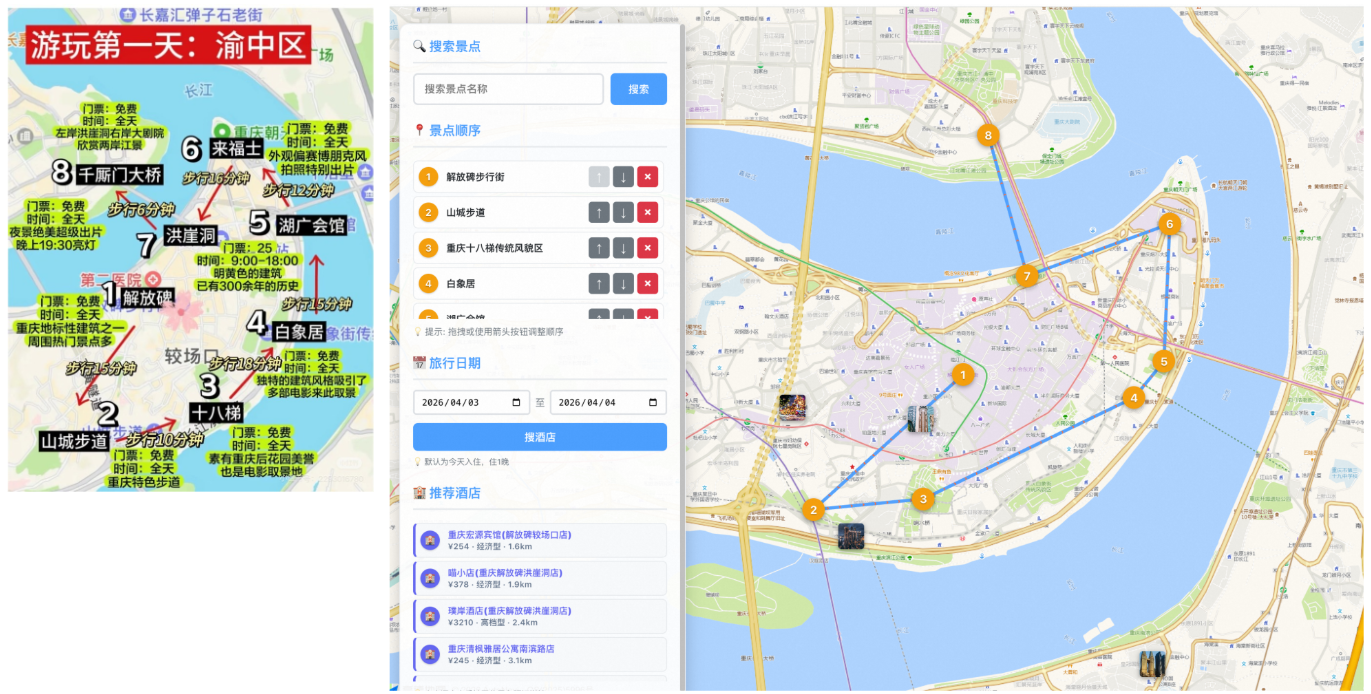
Travelmapify is a ClawHub skill for OpenClaw and Claw-like agents. Paste a travel itinerary or travel plan, drop a screenshot, or list places in order—your agent turns it into an interactive travel map with geocoded stops, optimized routes, and built-in FlyAI hotel search.
1000+ users
Two ways to install:
Terminal — run the ClawHub CLI
clawhub install flyai-travelmapify
Chat — ask your agent (OpenClaw or a Claw-like agent)
install flyai-travelmapify
Chat With OpenClaw:
You
flyai-travelmapify 三亚美高梅,三亚鹿回头
OpenClaw
Excellent! Your Sanya travel map has been created successfully with both locations:
🗺️ Your Sanya Travel Map is Ready!
📍 Locations Processed:
-
三亚美高梅度假酒店 (Sanya MGM Resort Hotel) - [109.63584, 18.228371]
- Address: 龙海路17号
- Rating: 4.5 ⭐
-
鹿回头 (Luhuitou Scenic Area) - [109.494806, 18.21604]
- Address: 吉阳区
- Famous scenic viewpoint in Sanya
🔗 Access Your Interactive Map: http://localhost:9000/sanya-mgm-map.html
🏨 Hotel Search Features:
- ✅ Real-time hotel search powered by FlyAI
- ✅ Hotels near 鹿回头 (your final destination)
- ✅ Direct booking links with pricing
- ✅ Interactive map markers
✨ Map Features:
- Route Optimization: Shows the best path between MGM Resort and Luhuitou
- Drag-and-drop: Reorder your itinerary if needed
- Add More Attractions: Use the search function to add other Sanya attractions
- Mobile Responsive: Works on all devices
- LocalStorage: Your changes are automatically saved
The map uses the fully portable version of flyai-travelmapify that I optimized earlier, so it works independently of any hardcoded local paths and can be shared with other users.
You can now:
- Open the map in your browser
- Click "搜酒店" to find hotels near 鹿回头
- Adjust the route order if you prefer to visit Luhuitou first
- Add more Sanya attractions like 天涯海角, 亚龙湾, or 蜈支洲岛 using the search function
Enjoy your Sanya trip planning! 🏖️
Why planners use Travelmapify
Plans that look intentional
Turn rough itineraries into numbered stops, clear order, and a map that reads like a real trip—not a wall of text.
Image or text, your choice
Start from a screenshot (notes app, Xiaohongshu-style posts, photos) or a simple comma-separated list of places.
From idea to map quickly
Geocode stops, connect the route, and iterate in the browser without manually pinning every location.
Hotels when you need them
Built-in FlyAI hotel search near your destination keeps lodging next to the route instead of in another tab.
How Travelmapify fits your workflow
Install the skill in your agent once (OpenClaw, Claw, or compatible), then repeat this loop for every trip:
What you get with Travelmapify
The Flyai Travelmapify skill equips OpenClaw-, Claw-, and compatible agents with a full itinerary pipeline: extraction, coordinates, routing, built-in FlyAI hotel search, and presentation in one place.
Dual input modes
Vision-friendly parsing from travel screenshots plus a fast path when you already have a list of place names.
Geocoding you can trust
Resolve ambiguous stops with confirmation flows so pins land on the right city, district, or landmark.
Route-first map UX
Numbered markers, directional context, and reorder tools so the story of the day matches how you move through it.
Edit vs. present
Toggle between a full editing workspace and a clean view mode when you are sharing with friends or clients.
Built-in FlyAI hotel search
Search real lodging near your destination with sensible defaults and clear loading states—FlyAI hotel search is built into the skill.
Self-contained HTML output
Generate maps you can open over HTTP with isolated storage per trip so drafts do not overwrite each other.
Travel planners on Travelmapify
Short notes from people who turned messy trip notes into maps their groups could follow.
David Chen
Trip lead, East Asia loop
We had screenshots from three different apps. Travelmapify pulled the stops in order and finally gave us one link everyone could open. Game changer for group chats.
Rachel Kim
Content creator
I plan shoots on the go. Dropping a photo of my handwritten list and getting a real map back—without manually geocoding every café—saved me hours.
Marcus Thompson
Solo traveler
Reorder stops until the day made sense, then switched to view mode before sending it to friends. Felt like a proper itinerary instead of a wall of names.
Sofia Garcia
Ops manager, company offsite
Hotel search next to the route meant fewer back-and-forth threads. Finance saw distances; attendees saw the map. Same artifact, less confusion.
James Wilson
Product designer
The skill fits how I already work in OpenClaw. Install once, paste a plan, iterate. I use it for weekend trips and for workshop city walkthroughs.
Anna Zhang
Family trip organizer
Grandparents needed something simple. The clean view map with numbered stops was the first version they actually used without calling me.
Travelmapify & Flyai Travelmapify — FAQ
Still stuck? Reach out by email from the footer—we are happy to help with setup or trip-specific edge cases.
What is Travelmapify?
Travelmapify is an agent skill (Flyai Travelmapify on ClawHub). You install it for OpenClaw, Claw, or similar agents; the skill drives the workflow that extracts stops, geocodes them, builds the map, and includes built-in FlyAI hotel search. This site helps you install and run that skill.
How do I install the skill?
Use the ClawHub CLI: clawhub install flyai-travelmapify. Alternatively, ask your OpenClaw or Claw agent in chat to install flyai-travelmapify for you—the skill id is the same.
What can I send as input?
A screenshot or photo of a written itinerary works in image mode. In text mode, paste comma-separated place names in the order you want to visit. The skill tries to preserve numbering and sequence from images when it is visible.
Do I need map API keys?
Geocoding and tiles typically rely on Amap (or your configured provider) through the skill’s scripts. Check the skill documentation for required environment variables and any local proxy or server steps before you run it.
How do hotel results appear?
The generated map runs real hotel search through built-in FlyAI, with loading states and booking-oriented results alongside your route and POIs.
Why serve the HTML over HTTP?
Interactive maps and browser APIs behave more reliably over http:// than file://. The skill can start a small local server so previews and features work the same way for you and anyone you share with.
Map your next trip with Travelmapify
Install flyai-travelmapify, paste your plan, and ship an interactive route your group can actually use.